

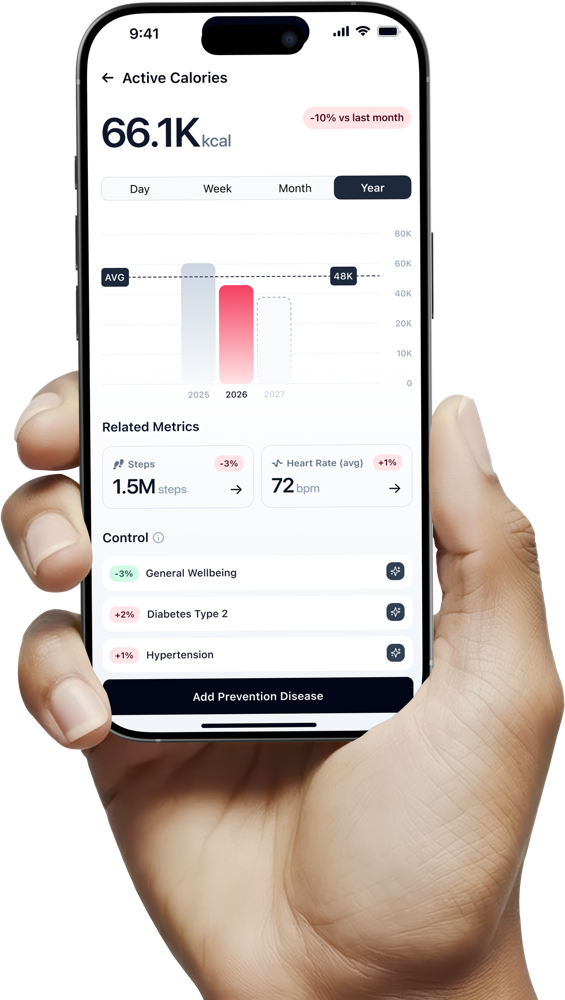
Getting value out of ONU takes four steps, and none of them require you to change what you already use to track your health. Here's exactly what happens from the moment you connect your first data source.
Step 01
Connect
Link Apple Health, Whoop, Garmin, or upload a lab result — no new hardware required.
Step 02
Understand
ONU's AI health engine looks for patterns across everything connected, not one metric in isolation.
Step 03
Score
Get a single daily number and a plain-language explanation of what's driving it.
Step 04
Improve
A daily, evolving plan aimed at actually moving your numbers — not a generic checklist.
Step 1
Connect what you already use — genuinely any device
ONU doesn't ask you to adopt a new wearable to get started (though the ONU Bracelet is there afterward if you want the full experience). Instead, it connects to the health platforms already holding your data.
Apple Health
The sleep, activity, and heart rate data already collected by your iPhone and Apple Watch.
Whoop
Recovery, strain, and sleep performance metrics.
Garmin
Activity, training load, and heart rate data from Garmin devices.
Effectively anything else
Most other trackers and wearables sync into Apple Health or export standard health data, so if you're coming from a competitor's device or app, ONU can typically read that history too.
You can also upload lab results directly — a PDF from a doctor's visit, a screenshot of an online patient portal, or documents from an independent testing service. Converting to ONU from whatever you used before is meant to take minutes: connect, and ONU starts working immediately. See the exact connection steps for each platform.
Step 2
ONU looks for what's actually connected, not just what's collected
This is the step most health apps skip. Once your data is linked, ONU's AI health engine doesn't just display each metric side by side — it looks for relationships between them.
- A string of short nights correlating with an elevated resting heart rate the following days
- A stress pattern that consistently precedes a drop in sleep quality
- A lab marker sitting near the edge of a reference range, considered alongside activity and recovery trends rather than as an isolated number
This is the same principle behind how ONU reads a blood test — a single flagged marker means something different in the context of your broader health picture than it does sitting alone on a lab report.
Step 3
You get a score and an explanation, not just a chart
Every day, ONU compiles what it's found into the ONU Score — one number that reflects your sleep, recovery, activity, and stress signals together — along with a plain-language explanation of what's driving it. If your score dipped, ONU tells you why in a sentence, not a spreadsheet.
Step 4
You get an improvement plan, not just a chart to look at
The last step is the one that actually changes behavior — and the one that separates ONU from a tracker: a daily plan that's specific to what your data shows this week, aimed at actually moving your numbers rather than just describing them. That might mean a note about your wind-down routine if your sleep onset has been slipping, or a nudge to prioritize recovery if your training load has outpaced your rest. Whether you're training for an event or just trying to make it through a demanding work week without burning out, the plan is built from your own patterns, not a template applied to everyone.
This is the part of ONU that runs the deepest on ONU Pro, the subscription that unlocks the full improvement engine — see current pricing and what each tier includes. Subscribing itself happens inside the app once you've downloaded it.
Deep dive
Under the hood
FAQ
Frequently asked questions
No — the core process is built around automatic data syncing from your connected wearable or the ONU Bracelet. Lab uploads are the one manual step, and even those just require uploading a document rather than re-entering data by hand.
Basic tracking and your first ONU Score typically appear within minutes of your first sync. More specific pattern-based insights generally become more useful after one to two weeks of consistent data, since that's the minimum window needed to distinguish a real trend from single-day noise.
Yes — regardless of data source, ONU follows the same connect, understand, act, and repeat cycle; the only difference is which device is supplying the underlying sleep, heart rate, and activity data.
You can ask the AI health engine directly within the app for more detail on any insight or score explanation, and it will walk through the specific data points behind that particular conclusion.
The core connect-understand-act loop runs on the free tier. The deepest version of "improve" — full biomarker interpretation, longer trend windows, and expanded action planning — is part of ONU Pro, ONU's monthly or annual subscription, started inside the app after download. If you later want the most accurate version of the data going into the process, the ONU Bracelet is available afterward for an extra $99.
Ready to connect your data? Start here or back up to the full product overview.
ACTION
Know it before it happens
ONU provides you with tools to build your healthy future; now it's your time to use them!
Any device you already use — no new hardware required
Link Apple Health, Whoop, or Garmin, or upload a lab result. Most other trackers sync into Apple Health too, so switching from another app usually takes minutes.


ONU looks for what's connected, not just what's collected
The AI health engine cross-references sleep, stress, activity, and lab data to find relationships most single-purpose trackers miss — the same way a flagged lab marker means something different in the context of your broader trends.
One daily number, explained in plain language
Every day, ONU compiles what it's found into the ONU Score — sleep, recovery, activity, and stress together — with a plain-language reason behind it. If your score dipped, ONU tells you why in a sentence, not a spreadsheet.
A daily plan built from your own patterns
Not a generic checklist — a specific nudge based on what your data shows this week, whether that's protecting your wind-down routine or prioritizing recovery after a heavy training block.